


Microsoft has made a significant and necessary security upgrade for its products. Windows, adding new protections aimed at preventing phishing attacks that exploit Remote Desktop Connection (.rdp) files. This strategy includes warnings about the risks of using RDP files and proactively disabling dangerous shared resources by default. This way, users will be better informed and protected from threats from malicious actors.
RDP files are widely used in corporate environments to facilitate remote connection to computers and systems. IT administrators can configure them to allow users to access their local resources, such as printers and storage media, on remote devices. However, cybercriminals exploit this functionality through phishing attacks, sending malicious RDP files that allow remote access to victims' computers.
According to reports, the Russian state-sponsored hacking group APT29 has previously used these RDP files to steal both sensitive information and credentials from victims. The attackers can redirect local resources, steal data, or even intercept authentication services like Windows Hello, creating critical security implications for users and organizations.

These attacks can have serious consequences for businesses, as they allow malicious attackers to gain access to valuable data and resources, compromising the integrity and confidentiality of user information.
New RDP protections are being released
In the context of the April 2026 cumulative updates for the Windows 10 (KB5082200) and Windows 11 (KB5083769 and KB5082052), Microsoft announced the release of new protections aimed at preventing malicious use of RDP files. This move is considered crucial to improving user security and is indicative of the attention Microsoft is paying to emerging threats.
As Microsoft warns, “Malicious actors are abusing this capability by sending RDP files through phishing.” When users open these files, their devices silently connect to servers under the control of attackers, granting them access to local resources, files, and credentials.
After installing the update, users will receive an educational warning the first time they open the RDP file, explaining the risks involved. Users are asked to acknowledge their understanding of these risks before proceeding, providing additional layers of protection.
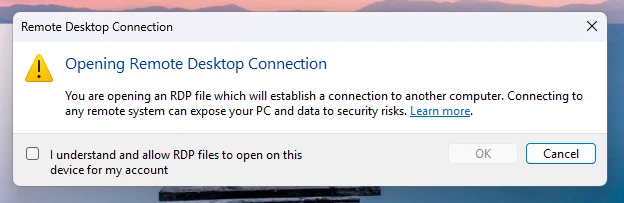
Source: Microsoft
On subsequent attempts to open the RDP file, a new security dialog will appear with details about the publisher's signature and the location of the remote system. All redirections of local resources (such as drives and clipboard) will be disabled by default.
If the RDP file is not digitally signed, users will receive a warning informing them that the remote connection is from an unverified publisher, warning them of the potential consequences of their potential interception.
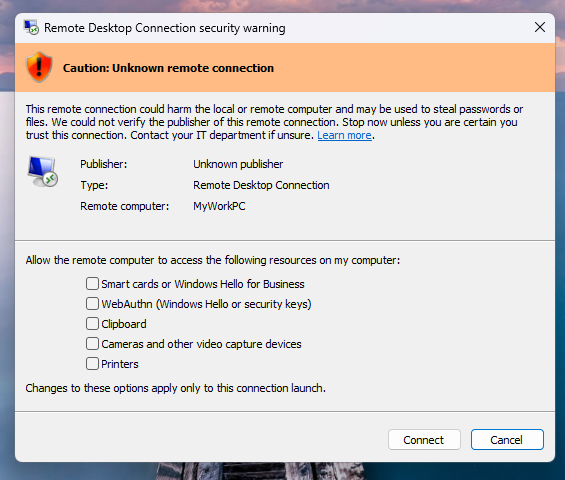
Source: Microsoft
If the file is digitally signed, users will see the publisher's name, but will be prompted to verify its legitimacy before continuing the connection. It is important to note that these new protections apply only to connections initiated through RDP files and not to connections made through the Remote Desktop client.
Microsoft provides the ability for administrators to temporarily disable these protections by modifying registry keys, but it is recommended that they be kept enabled due to the serious risks associated with RDP files.
The introduction of these new protocols is a positive step towards enhancing user security and protecting their information from malicious attacks. For more information on the new protections and cybersecurity, you can visit Microsoft security website.
Automated test execution proves the path exists. BAS proves if your controls stop it. Most teams run without each other.
This white paper maps six validation surfaces, shows where coverage ends, and provides practitioners with three diagnostic questions for any tool evaluation.